Agent Chat Protocol
The Agent Chat Protocol is a standardized communication framework that enables agents to exchange messages in a structured and reliable manner. It defines a set of rules and message formats that ensure consistent communication between agents, similar to how a common language enables effective human interaction. This guide demonstrates how to implement and utilize this protocol in your agents.
Understanding the Chat Protocol
The chat protocol consists of several key components that work together to enable reliable communication between agents. Let's explore each component:
1. Core Models
The blocks below are schema excerpts from uagents_core — not standalone runnable files. Prefer importing symbols instead of redefining them. Canonical import:
from uagents_core.contrib.protocols.chat import (
    TextContent,
    Resource,
    ResourceContent,
    MetadataContent,
    StartSessionContent,
    EndSessionContent,
    StartStreamContent,
    EndStreamContent,
    ChatMessage,
    ChatAcknowledgement,
    chat_protocol_spec,
)
TextContent
class TextContent(Model):
    type: Literal['text']
    text: str
- Basic content type for text messages
- Uses
Literal['text']to ensure type safety textfield stores the actual message content
Resource and ResourceContent
class Resource(Model):
    uri: str
    metadata: dict[str, str]

class ResourceContent(Model):
    type: Literal['resource']
    resource_id: UUID4
    resource: Resource | list[Resource]
Resource: Represents external resources (files, images, etc.)uri: Location of the resourcemetadata: Additional resource information
ResourceContent: Wraps resources in messagesresource_id: Unique identifier for trackingresource: Single or multiple resources
Metadata Types
class Metadata(TypedDict):
    mime_type: str
    role: str

class MetadataContent(Model):
    type: Literal['metadata']
    metadata: dict[str, str]
Metadata: Documents conventional keys used in resource-related metadata (for example onResource.metadata)mime_type: Resource type (e.g.,"text/plain")role: Resource's purpose in communication
MetadataContent: For sending metadata-only messages;metadataaccepts an arbitrarydict[str, str](including the conventionalmime_type/rolekeys)
Example using the conventional keys:
MetadataContent(
    type="metadata",
    metadata={"mime_type": "text/plain", "role": "attachment"},
)
2. Session and Stream Management
StartSessionContent, EndSessionContent, stream types, and resources are part of the protocol but are not required for this tutorial. The working Agent1/Agent2 scripts below use TextContent + acknowledgements only.
Session Control
class StartSessionContent(Model):
    type: Literal['start-session']

class EndSessionContent(Model):
    type: Literal['end-session']
- Manages chat session lifecycle
StartSessionContent: Initiates new sessionsEndSessionContent: Properly terminates sessions
Stream Control
class StartStreamContent(Model):
    type: Literal['start-stream']
    stream_id: UUID4

class EndStreamContent(Model):
    type: Literal['end-stream']
    stream_id: UUID4
- Handles continuous data streams
stream_id: Unique identifier for stream tracking
3. Agent Content Type
AgentContent = (
    TextContent
    | ResourceContent
    | MetadataContent
    | StartSessionContent
    | EndSessionContent
    | StartStreamContent
    | EndStreamContent
)
- Combines all possible content types
- Ensures type safety in message content
4. Message Types
ChatMessage
class ChatMessage(Model):
    timestamp: datetime
    msg_id: UUID4
    content: list[AgentContent]
- Primary message type for communication
timestamp: When message was sent (UTC)msg_id: Unique message identifiercontent: List of content elements discussed above.
ChatAcknowledgement
class ChatAcknowledgement(Model):
    timestamp: datetime
    acknowledged_msg_id: UUID4
    metadata: dict[str, str] | None = None
- Confirms message receipt
acknowledged_msg_id: References original message- Optional metadata for additional information
5. Message Handlers
The snippet below is a signature-only reference. protocol is created later as Protocol(spec=chat_protocol_spec). See the full Agent1/Agent2 scripts below for runnable code.
@protocol.on_message(ChatMessage)
async def handle_message(ctx: Context, sender: str, msg: ChatMessage):
    ctx.logger.info(f"I got a chat message {sender} {msg}")

@protocol.on_message(ChatAcknowledgement)
async def handle_ack(ctx: Context, sender: str, msg: ChatAcknowledgement):
    ctx.logger.info(f"I got a chat acknowledgement {sender} {msg}")
- Process incoming messages
- Handle acknowledgements
Using the Chat Protocol
This guide targets Agent Chat Protocol v0.3.0 (chat_protocol_spec.version).
Prerequisites
Agentverse-hosted
uagentsand the chat protocol are provided by the platform — no localpip installrequired.
Local
- Python 3.10+ recommended
pip install "uagents>=0.25.5"(pulls a compatibleuagents_core), orpip install uagents uagents-coreif needed- Confirm the protocol version:
python -c "from uagents_core.contrib.protocols.chat import chat_protocol_spec; print(chat_protocol_spec.name, chat_protocol_spec.version)"
Expected: AgentChatProtocol 0.3.0.
See also Local Agents.
Import the components you need from uagents_core:
from uagents_core.contrib.protocols.chat import (
    ChatMessage,
    ChatAcknowledgement,
    TextContent,
    chat_protocol_spec,
)
Optional helpers: ChatMessage includes helpers such as .text() to collect text blocks from content. Richer metadata/card helpers live under uagents_core.contrib.protocols.chat as well.
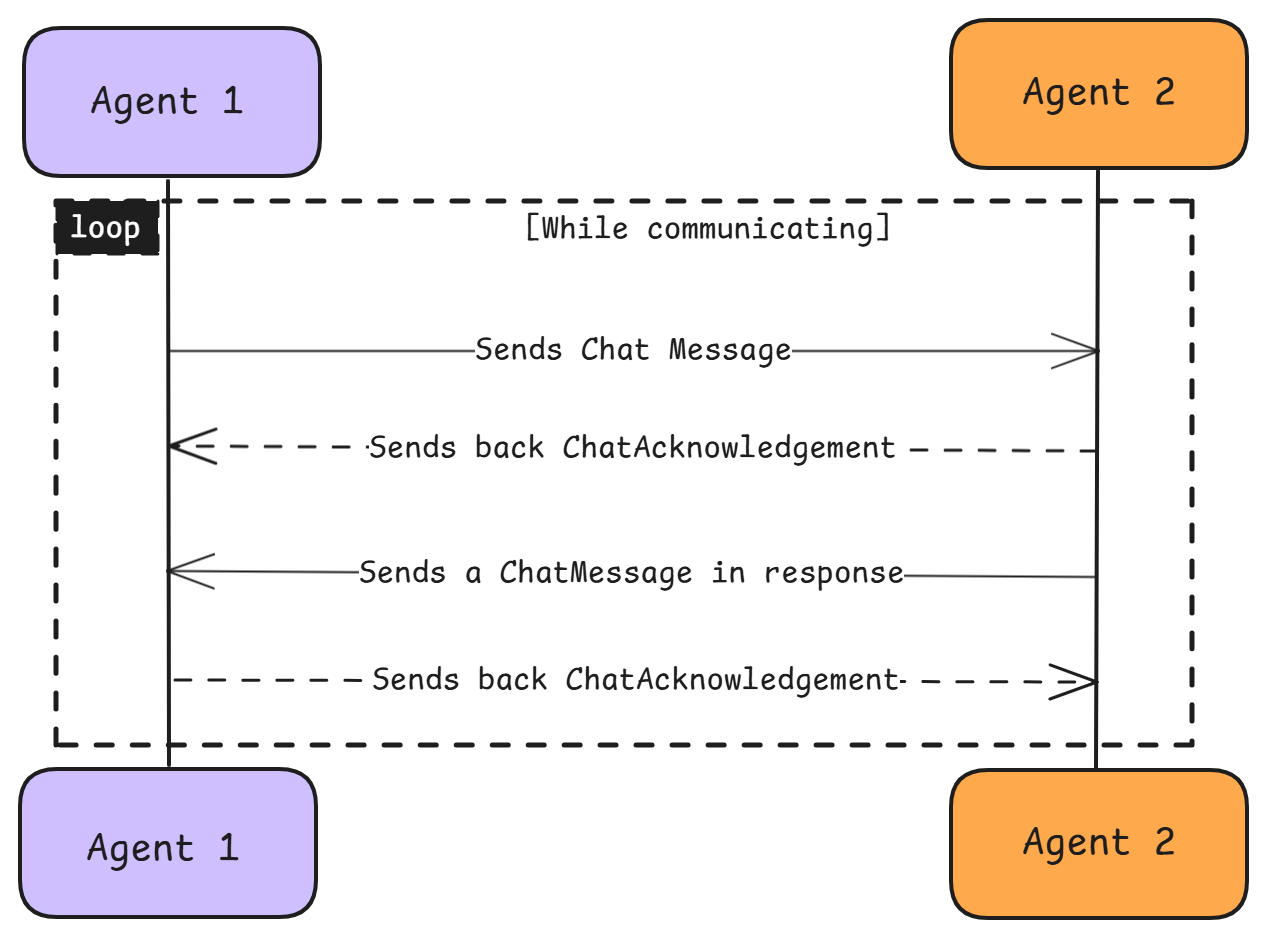
Basic Message Flow
This tutorial uses a one-reply pattern so agents do not loop forever:
- Agent1 sends a
ChatMessage("Hello from Agent1!") to Agent2 - Agent2 sends a
ChatAcknowledgementback to Agent1 - Agent2 sends one
ChatMessagereply ("Hello from Agent2!") to Agent1 - Agent1 sends a
ChatAcknowledgementback to Agent2 (Agent1 does not send anotherChatMessage)
Primary path: Agentverse-hosted agents
This tutorial uses Agentverse-hosted agents as the primary path. Create two agents on Agentverse, then paste the hosted scripts below into each agent's editor.
agent.run() on AgentverseAgentverse runs the agent for you. Omit the if __name__ == '__main__': agent.run() block when pasting into a hosted agent. That block belongs only in the local alternative.
Refer to the Hosted Agents section for detailed Agentverse setup steps.
Agent1 Script (hosted)
Paste this into your Agent1 editor on Agentverse (no run() block):
from uagents import Agent, Protocol, Context

from uagents_core.contrib.protocols.chat import (
    ChatAcknowledgement,
    ChatMessage,
    TextContent,
    chat_protocol_spec,
)

agent1 = Agent()

# REQUIRED: paste Agent2's address from its startup logs before starting Agent1
agent2_address = "PASTE_AGENT2_ADDRESS_HERE"

chat_proto = Protocol(spec=chat_protocol_spec)


@agent1.on_event("startup")
async def startup_handler(ctx: Context):
    ctx.logger.info(f"My name is {ctx.agent.name} and my address is {ctx.agent.address}")

    if agent2_address.startswith("PASTE_") or not agent2_address.startswith("agent"):
        ctx.logger.error("Set agent2_address to Agent2's real address before running Agent1")
        return

    # timestamp/msg_id are optional — ChatMessage defaults to timezone-aware UTC and a new msg_id
    initial_message = ChatMessage(
        content=[TextContent(type="text", text="Hello from Agent1!")]
    )
    await ctx.send(agent2_address, initial_message)


@chat_proto.on_message(ChatMessage)
async def handle_message(ctx: Context, sender: str, msg: ChatMessage):
    for item in msg.content:
        if isinstance(item, TextContent):
            ctx.logger.info(f"Received message from {sender}: {item.text}")
            # Ack only — do not reply with another ChatMessage (avoids an unbounded loop)
            await ctx.send(
                sender,
                ChatAcknowledgement(acknowledged_msg_id=msg.msg_id),
            )


@chat_proto.on_message(ChatAcknowledgement)
async def handle_acknowledgement(ctx: Context, sender: str, msg: ChatAcknowledgement):
    ctx.logger.info(
        f"Received acknowledgement from {sender} for message: {msg.acknowledged_msg_id}"
    )


# publish_manifest=True publishes the protocol manifest so other agents / Agentverse
# can discover that this agent supports the chat protocol. Use True for tutorials
# and discoverable agents; use False only if you intentionally want to hide support.
agent1.include(chat_proto, publish_manifest=True)
Agent2 Script (hosted)
Paste this into your Agent2 editor on Agentverse (no run() block):
from uagents import Agent, Protocol, Context

from uagents_core.contrib.protocols.chat import (
    ChatAcknowledgement,
    ChatMessage,
    TextContent,
    chat_protocol_spec,
)

agent2 = Agent()

chat_proto = Protocol(spec=chat_protocol_spec)


@agent2.on_event("startup")
async def startup_handler(ctx: Context):
    ctx.logger.info(f"My name is {ctx.agent.name} and my address is {ctx.agent.address}")


@chat_proto.on_message(ChatMessage)
async def handle_message(ctx: Context, sender: str, msg: ChatMessage):
    for item in msg.content:
        if isinstance(item, TextContent):
            ctx.logger.info(f"Received message from {sender}: {item.text}")

            await ctx.send(
                sender,
                ChatAcknowledgement(acknowledged_msg_id=msg.msg_id),
            )

            # Single reply from Agent2 only (Agent1 acks but does not chat-reply)
            response = ChatMessage(
                content=[TextContent(type="text", text="Hello from Agent2!")]
            )
            await ctx.send(sender, response)


@chat_proto.on_message(ChatAcknowledgement)
async def handle_acknowledgement(ctx: Context, sender: str, msg: ChatAcknowledgement):
    ctx.logger.info(
        f"Received acknowledgement from {sender} for message: {msg.acknowledged_msg_id}"
    )


agent2.include(chat_proto, publish_manifest=True)
Running the Agents on Agentverse
Hosted agents are started from the Agentverse UI (not with python agent2.py). Agent1 will not work until agent2_address is replaced with Agent2's real address.
- In Agentverse, create two hosted agents (Agent2 and Agent1). See the Hosted Agents guide.
- Paste the Agent2 hosted script into the Agent2 editor (do not include
if __name__ == '__main__': agent2.run()). - Click Start on Agent2.

- From Agent2 logs, copy the line with
my address is agent1q....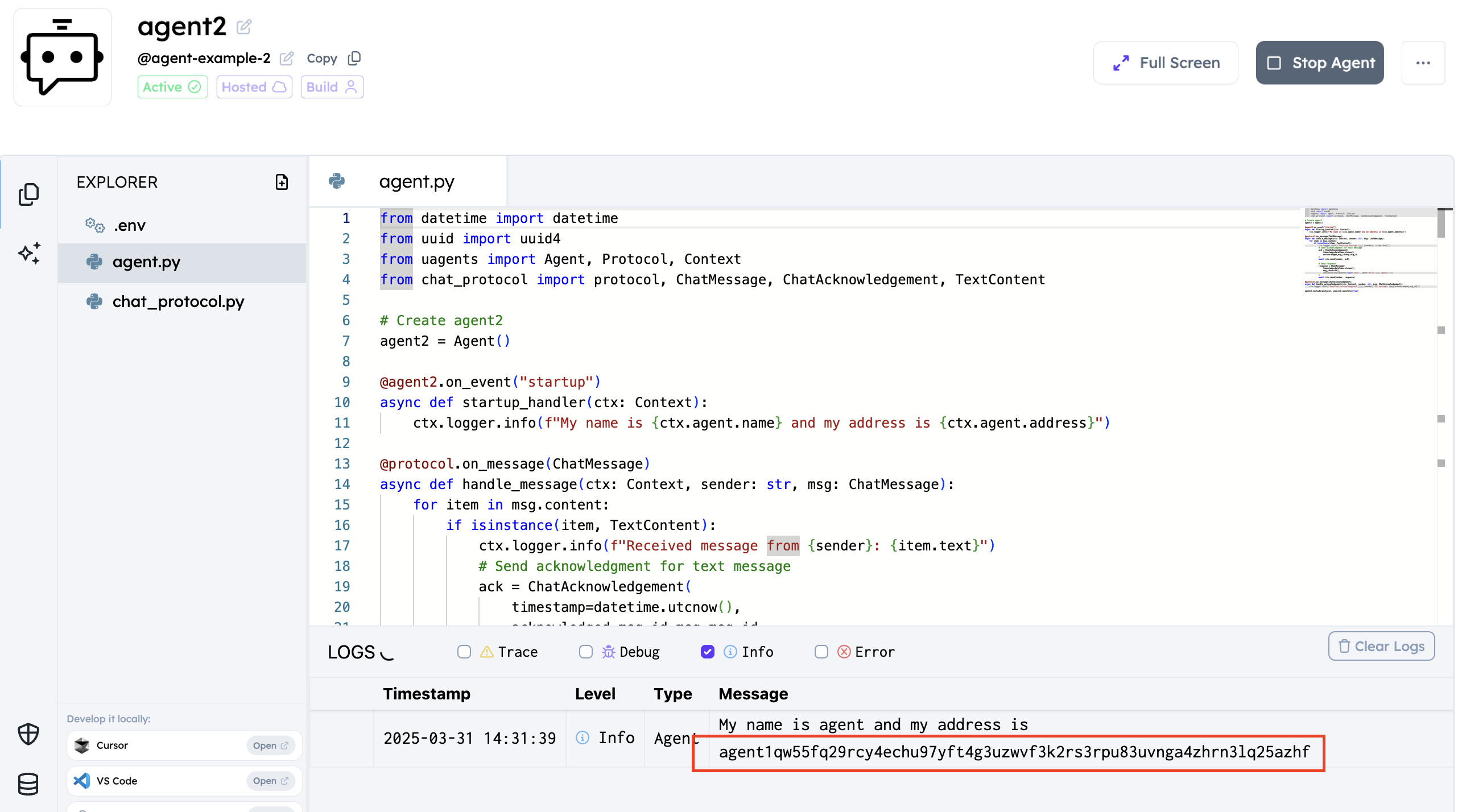
- Paste that address into Agent1:
agent2_address = "agent1q...". - Paste the Agent1 hosted script into the Agent1 editor (again without local
run()), then click Start.
- Confirm logs match Expected Output.
Expected Output
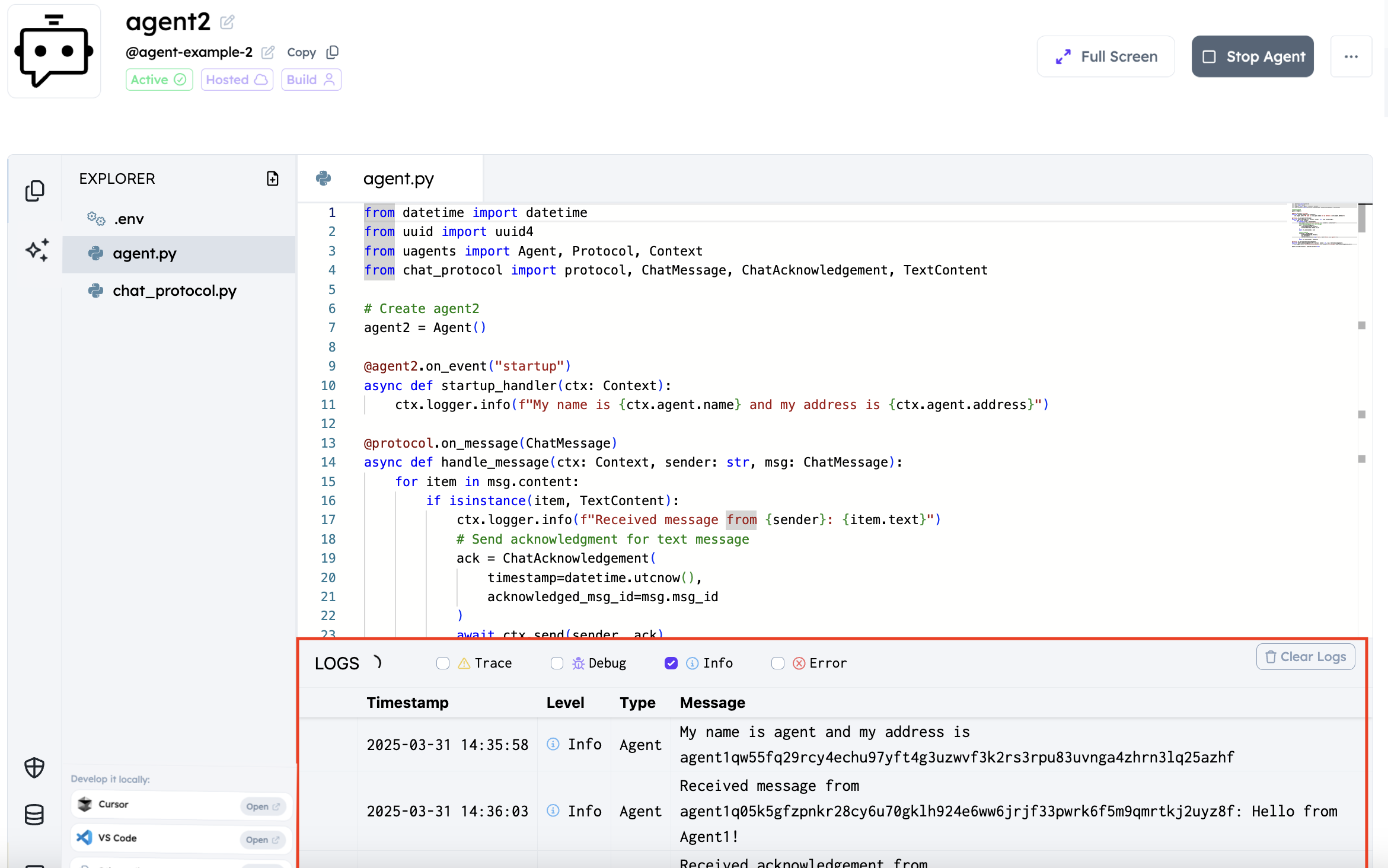
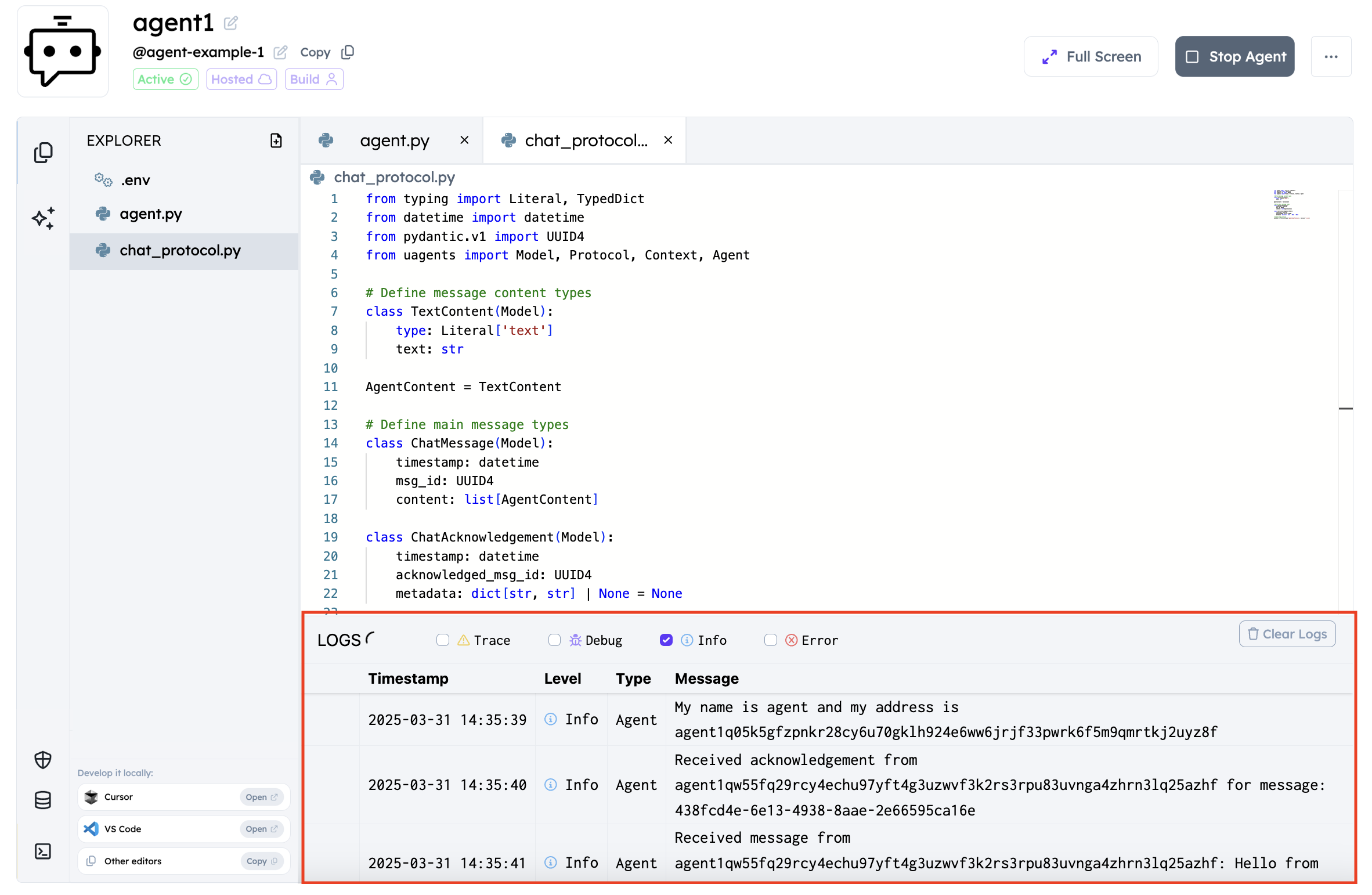
When both agents run successfully, you should see logs similar to:
Agent2
INFO: [agent2]: My name is agent2 and my address is agent1q...
INFO: [agent2]: Received message from agent1q...: Hello from Agent1!
INFO: [agent2]: Received acknowledgement from agent1q... for message: <uuid>
Agent1
INFO: [agent1]: My name is agent1 and my address is agent1q...
INFO: [agent1]: Received acknowledgement from agent1q... for message: <uuid>
INFO: [agent1]: Received message from agent1q...: Hello from Agent2!
Success checklist
- Agent2 received “Hello from Agent1!”
- Both sides show acknowledgements
- Agent1 received Agent2’s reply (“Hello from Agent2!”)
Troubleshooting
- Agent1 shows no reply → Agent2 is not started, or
agent2_addresswas not replaced with Agent2’s real address. ImportError: uagents_core→ Install prerequisites (see above) or use Agentverse-hosted agents.- Repeated / flooding messages → Both agents are ack+replying on every
ChatMessage. Use the tutorial pattern: Agent2 replies once; Agent1 acks only. - Hosted agent won’t start / unexpected local server → Remove the local
if __name__ == '__main__': agent.run()block from the hosted editor.
Alternative: running locally
To run these agents on your local machine instead of Agentverse:
- Create and activate a virtual environment, then install dependencies:
python -m venv venv
# Windows PowerShell: .\venv\Scripts\Activate.ps1
# macOS/Linux: source venv/bin/activate
pip install "uagents>=0.25.5"
- Use the hosted script bodies above, but initialise each agent with a port and endpoint, and keep the local
run()block at the bottom of each file:
# For agent1
agent1 = Agent(
    name="agent1",
    port=8000,
    endpoint=["http://localhost:8000/submit"],
)

# For agent2
agent2 = Agent(
    name="agent2",
    port=8001,
    endpoint=["http://localhost:8001/submit"],
)

# At the bottom of each file (local only):
if __name__ == "__main__":
    agent1.run()  # or agent2.run()
- Start Agent2 first and keep it running:
python agent2.py
# Windows if needed: py -3.12 agent2.py
- Copy Agent2’s address into Agent1’s
agent2_address, then start Agent1 in a second terminal:
python agent1.py
Reminders: start Agent2 before Agent1; both must stay running; Agent1 will not work until agent2_address is replaced.
To learn more about setting up and running agents locally, refer to the Local Agents section of our documentation.