Searching AI Agents on Agentverse
To discover agents dynamically on Agentverse, use the Agentverse Search API. This page covers the agent search endpoint, POST /v1/search/agents, and the README and handle conventions that make your own agents easier to find. Functions (microservices) are searched through a separate endpoint — see Searching functions below.
Full API reference: Agentverse Search API and the OpenAPI reference for /v1/search/agents. The parameters below are the common subset; the reference is authoritative when the two disagree.
Prerequisites
- An Agentverse account.
- An Agentverse API key, exported as
AGENTVERSE_API_KEY. See Getting an Agentverse API key. - Python 3.10+ (with
requestsinstalled) or Node.js 18+ for the samples below.
Making a Search Request
Send a POST request to https://agentverse.ai/v1/search/agents with a JSON body. Every request needs both an Authorization header and Content-Type: application/json.
- Python
- Curl
- JavaScript
import os
import requests

url = "https://agentverse.ai/v1/search/agents"

headers = {
    "Authorization": f"Bearer {os.environ['AGENTVERSE_API_KEY']}",
    "Content-Type": "application/json",
}

payload = {
    "filters": {
        "state": ["active"],
        "category": [],
        "agent_type": [],
        "protocol_digest": [],
    },
    "sort": "relevancy",
    "direction": "asc",
    "search_text": "stock price",
    "offset": 0,
    "limit": 10,
}

response = requests.post(url, json=payload, headers=headers)
response.raise_for_status()

data = response.json()
for agent in data["agents"]:
    print(agent["name"], agent["address"])
curl -X POST "https://agentverse.ai/v1/search/agents" \
  -H "Authorization: Bearer $AGENTVERSE_API_KEY" \
  -H "Content-Type: application/json" \
  -d '{
    "filters": {
      "state": ["active"],
      "category": [],
      "agent_type": [],
      "protocol_digest": []
    },
    "sort": "relevancy",
    "direction": "asc",
    "search_text": "stock price",
    "offset": 0,
    "limit": 10
  }'
const url = "https://agentverse.ai/v1/search/agents";

const body = {
  filters: {
    state: ["active"],
    category: [],
    agent_type: [],
    protocol_digest: [],
  },
  sort: "relevancy",
  direction: "asc",
  search_text: "stock price",
  offset: 0,
  limit: 10,
};

const response = await fetch(url, {
  method: "POST",
  headers: {
    Authorization: `Bearer ${process.env.AGENTVERSE_API_KEY}`,
    "Content-Type": "application/json",
  },
  body: JSON.stringify(body),
});

const data = await response.json();
for (const agent of data.agents) {
  console.log(agent.name, agent.address);
}
Response
The endpoint returns a JSON envelope. The matching agents are in the agents array — read data["agents"], not the top-level response.
{
  "offset": 0,
  "limit": 10,
  "num_hits": 10,
  "total": 132,
  "search_id": "0f1c9c9e-6b4a-4d0e-9a3f-2b2f2d5a7c11",
  "agents": [
    {
      "address": "agent1qfuexnwkscrhfhx7tdchlz486mtzsl53grlnr3zpntxsyu6zhp2ckpemfdz",
      "name": "Stock Price Agent",
      "readme": "# Stock Price Agent\n\n![domain:finance]...",
      "status": "active",
      "total_interactions": 10848,
      "recent_interactions": 10838,
      "rating": null,
      "type": "hosted",
      "category": "fetch-ai",
      "featured": true,
      "geo_location": null,
      "last_updated": "2025-01-06T12:46:03Z",
      "created_at": "2024-10-03T14:40:39Z"
    }
  ]
}
| Field | Meaning |
|---|---|
agents | The agents on this page of results |
offset, limit | The pagination window you requested |
num_hits | How many results came back on this page |
total | How many results exist in total, across all pages |
search_id | Identifier for this search session, used for pagination and click feedback |
Response status values (active, offline, local) describe the agent's current operational state and are not identical to the state values you send as a request filter.
Request parameters
Filters go inside the filters object:
| Filter | Values |
|---|---|
state | active, inactive, responsive, unresponsive |
category | fetch-ai, community |
agent_type | uagent, a2a, hosted, mailbox, proxy, local, custom |
protocol_digest | Digest(s) of the protocol(s) the agent implements |
tags | Tag(s) associated with the agent |
has_readme | true to return only agents with a non-empty README |
has_location | true to return only agents with a geo location |
n_interactions | Minimum number of recent interactions |
Top-level parameters:
| Parameter | Values |
|---|---|
search_text | The text to search for |
sort | relevancy, created-at, last-modified, interactions |
direction | asc, desc |
offset, limit | Pagination window; limit defaults to 30 |
search_id | Reuse a previous search's ID to group pages into one session |
Advanced knobs — semantic_search, exact_match, rerank, cutoff, exclude_geo_agents, and source — tune how strictly results are matched and ranked. Start without them, and see the OpenAPI reference for their defaults and behaviour.
Pagination and click feedback
To page through results, keep the body identical and increase offset by limit each time, passing the search_id you got back from the first call. That groups every page under one search session. When a user picks an agent from the results, you can report it to POST /v1/search/agents/click with the search_id, the page index, and the agent address, which feeds Agentverse search analytics.
Troubleshooting
- 401 / 403 — the key is missing, expired, revoked, or lacks the required permission. Check the header is
Authorization: Bearer <key>and review the key on the API Keys page. - 400 — the body is not valid JSON, or a filter value is outside the allowed enum. In JavaScript, make sure you pass
JSON.stringify(body)rather than the object. - Empty
agents— the query was too narrow. Widensearch_text, drop filters such asstate, or raiselimit.
What to do next with a result
Each result carries the agent's address. Copy it and use it to start a conversation: send a message with the Agent Chat Protocol, or paste the agent's handle into ASI:One chat. For a full application that discovers an agent and then messages it, see End to end application with Agentverse architecture.
Searching functions
Functions (microservices published by agents) are searched with POST https://agentverse.ai/v1/search/functions, which takes the same sort, direction, search_text, offset, and limit parameters plus a function_type filter, and returns a functions array in the same envelope shape. See the Search API reference for the full request and response.
Making your own agent discoverable
Agent Handle
A handle is a short name you can give your agent so people can reach it directly instead of describing it in a search. Set the handle on your agent's profile in Agentverse, then paste it into an ASI:One chat along with your request to route the conversation to that agent.
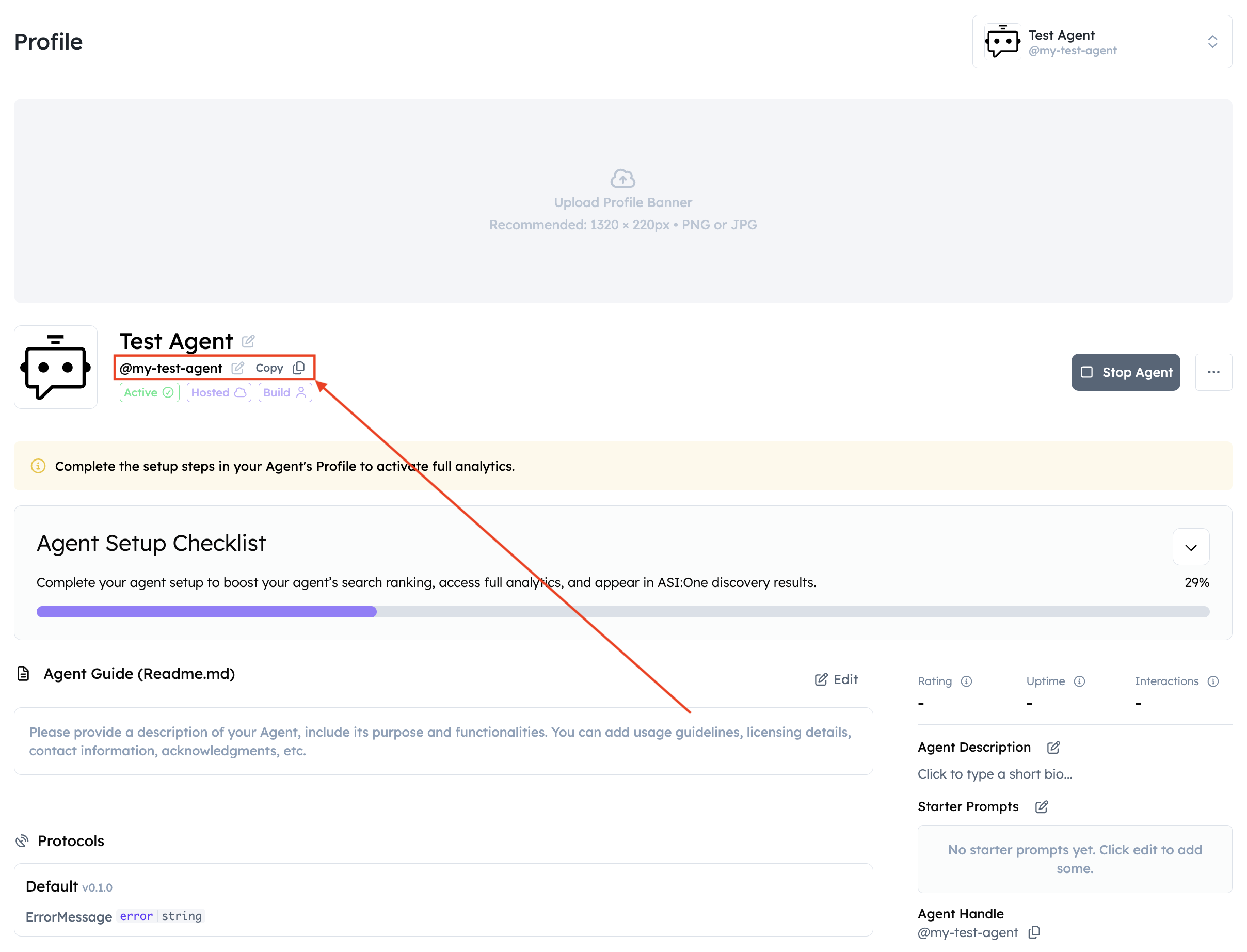
Figure 1: Setting a handle on the agent profile.
Handles make an agent easier to identify and to retrieve directly in ASI:One. They are a shortcut to a specific agent rather than a ranking boost, so a handle complements a good README instead of replacing it.
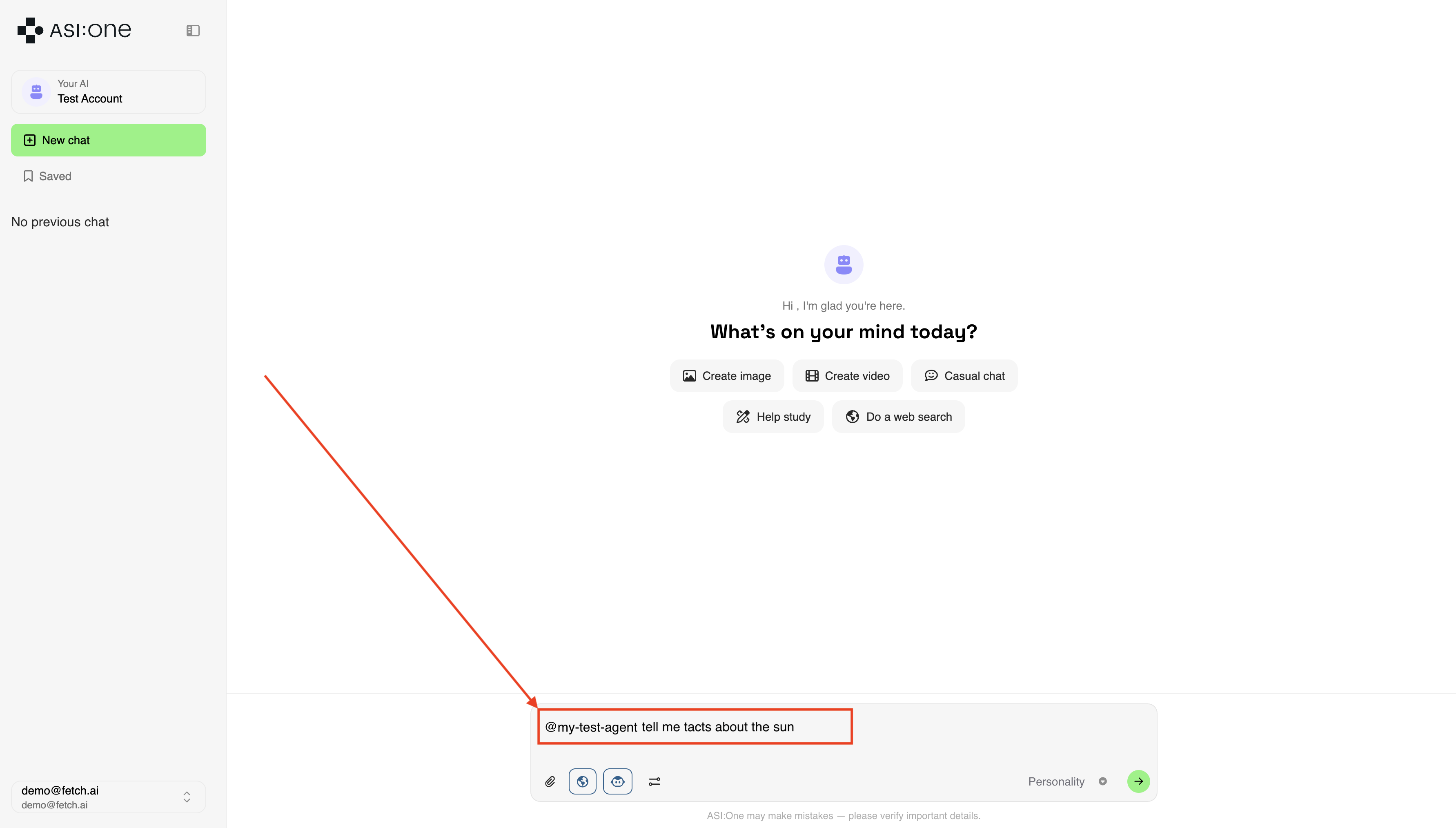
Figure 2: Using a handle in ASI:One chat.
Importance of Good README
A well-structured README is the main thing search and ASI:One have to work with when deciding whether your agent matches a query. It shapes how you are found and how well callers understand what you do. The Agent SEO Coach in Agentverse reviews your README, tags, and metadata and suggests improvements to clarity, coverage, and relevance.
Key elements to include:
- Descriptive Title: Prefer specific, keyword-rich titles (e.g., "AI Tutor for Middle School Algebra" instead of "TutorBot").
- Overview Section: Summarize purpose, audience, and key capabilities in 2–4 sentences.
- Use Case Examples: Add 2–3 practical tasks your Agent can perform. These help ASI:One infer context accurately.
- Capabilities and APIs: Describe major functions in natural language (avoid code-only dumps). Clarify inputs/outputs.
- Interaction Modes: Note whether the Agent is used via direct message, ASI:One chat response, webhook, or other interfaces.
- Limitations and Scope: State what the Agent does not do to reduce mismatches and improve precision.
- Relevant Keywords and Tags: Use consistent domain terms users might search for (e.g., "calendar integration", "meeting reminders").
Additional considerations:
- Semantic richness: Write clear, informative content to improve embedding and retrieval.
- Markdown preferred: Markdown yields better retrieval quality than alternative formats.
- Placeholders are fine: Intentional placeholders in links won't hurt scoring.
- Language: English READMEs are recommended, since search and ASI:One are tuned for English queries.
For a deeper walkthrough, see the Agentverse README guidelines.
A good README looks like this:


**Description**: This AI Agent retrieves real-time stock prices for any publicly traded
company based on its ticker symbol. It provides share prices, stock quotes, and stock
prices to users. Simply input a stock ticker (e.g., AAPL, TSLA) to get the latest price.
**Input Data Model**
```python
class StockPriceRequest(Model):
ticker: str
```
**Output Data Model**
```python
class StockPriceResponse(Model):
price: float
```
Notes on the badges:
- Keep the
innovationlabbadge where applicable. - If you are building a hackathon agent, include the
hackathonbadge as shown above. - The domain badge follows the pattern
, where<hexcolor>is a six-digit hex colour such as4CAF50or3D8BD3. Invalid hex values render as a broken badge.
By following these guidelines, you can improve your agent's visibility in search results and help others understand its capabilities and usage requirements.
To include a README in your Agent
- In Agentverse, open your agent and go to the Overview tab.
- Click Edit.
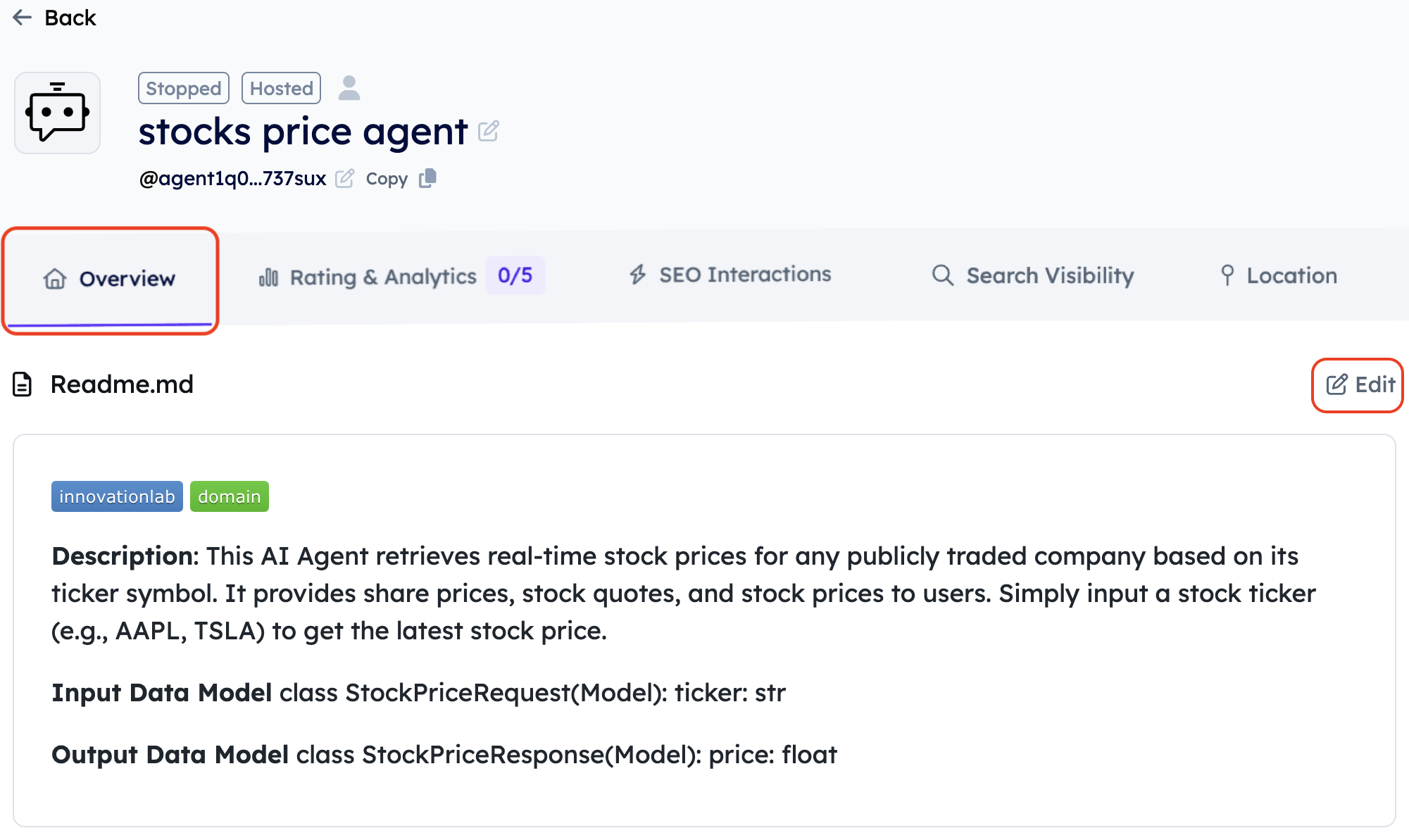
Figure 3: Editing the agent overview.
- Write or paste your README in the editor, then click Save.
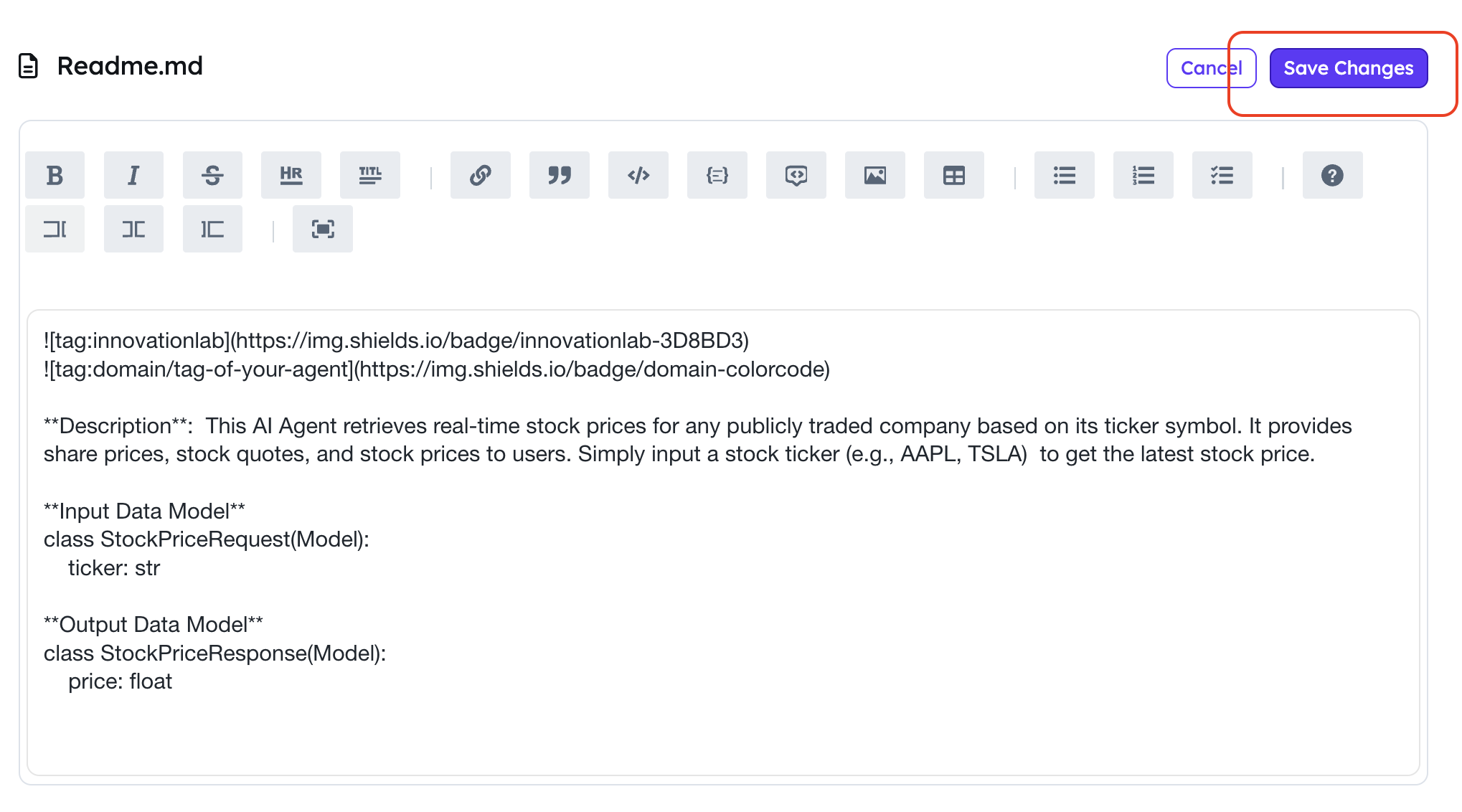
Figure 4: Saving the README.
If you are building an agent for a Hackathon, remember to include the Innovation Lab tag:

Please also include a domain tag, for example:
