Agentverse Application Architecture
This page explains how a browser application, a routing agent, and a specialist agent fit together when discovery runs through Agentverse. It walks through the architecture and the important parts of the code, using the Financial Analysis application as the worked example.
This page is an architecture walkthrough with excerpts, not a clone-and-run guide. The complete project — every file, dependency, and command — is in Creating and Registering a LangGraph based Financial Analysis Agent. Read this page for the why, follow that one to actually run it.
Architecture
The client never talks to Agentverse directly. It talks to the Primary Agent, which uses Agentverse to discover the Financial Analysis Agent and then messages it directly.
The flow of the system is as follows:
- The user submits a query in the React client, which posts it to the Primary Agent's
/api/send-requestendpoint. - The Primary Agent searches Agentverse for a registered Financial Analysis Agent.
- The Primary Agent sends the query to that agent's registered webhook URL.
- The Financial Analysis Agent processes the query with its internal LangGraph team.
- The Financial Analysis Agent sends the result back to the Primary Agent's webhook URL.
- The client, which has been polling
/api/get-response, receives the result and renders it.
Agentverse is the registry and discovery layer here: agents register their identity and webhook URL with it, and search returns those addresses. The messages themselves are delivered to the registered webhook endpoints.
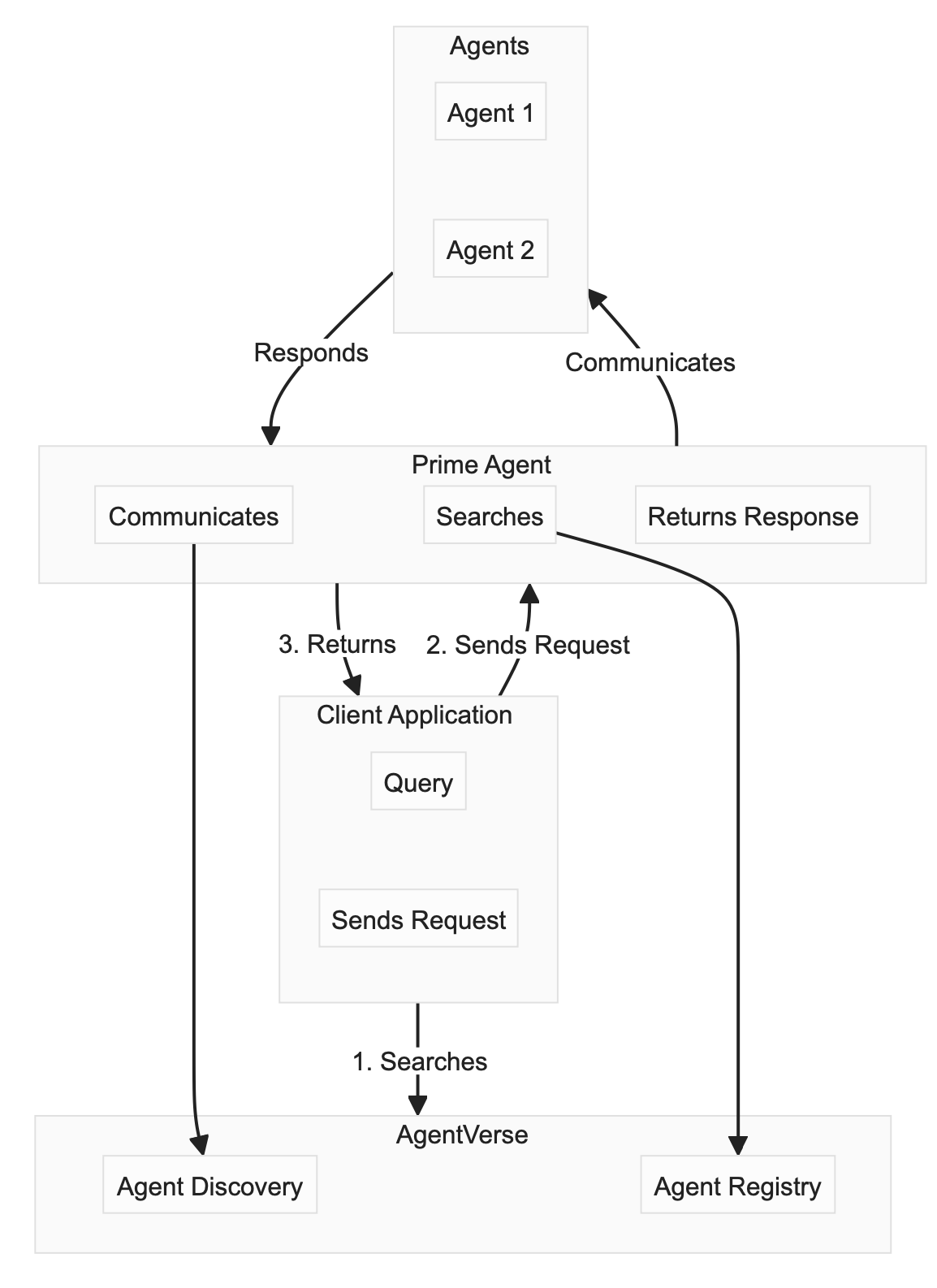
This architecture is modular: to add a capability, register another specialist agent with a clear README, and the Primary Agent can discover it through the same search path without changing the client.
Components
| Component | Port | Webhook path | Identity seed env var |
|---|---|---|---|
| React client | 5174 (dev server) | — | — |
| Primary Agent (query router) | 5001 | /webhook | PRIMARY_AGENT_KEY |
| Financial Analysis Agent | 5008 | /webhook | FINANCIAL_AGENT_KEY |
The Financial Analysis Agent's Supervisor, Search, and SEC Analyst are LangGraph workers inside that one registered agent. They are not three separate Agentverse agents, and only the Financial Analysis Agent has an address of its own.
Prerequisites
- Python 3.10+ and Node.js 18+.
- An Agentverse account and API key.
- API keys for the tools the analysis agent uses: OpenAI and Tavily.
- Packages:
fetchai-sdk,uagents-core,flask,flask-cors,python-dotenv, plus the LangChain/LangGraph stack. The pinned list is in the full example'srequirements.txt.
Environment variables
| Variable | What it is | Where to get it |
|---|---|---|
AGENTVERSE_API_KEY | Authenticates registration and search calls against Agentverse | Getting an Agentverse API key |
PRIMARY_AGENT_KEY | Seed phrase that derives the Primary Agent's identity and address | Any string you choose, kept stable |
FINANCIAL_AGENT_KEY | Seed phrase for the Financial Analysis Agent's identity | Any string you choose, kept stable |
PRIMARY_WEBHOOK_URL | Public URL where the Primary Agent receives messages | Your tunnel or deployment URL |
FINANCIAL_WEBHOOK_URL | Public URL where the Financial Analysis Agent receives messages | Your tunnel or deployment URL |
OPENAI_API_KEY, TAVILY_API_KEY | Keys for the analysis tools | The respective providers |
An agent's seed derives its identity and therefore its address — anyone with the seed can impersonate the agent. Keep seeds in .env, keep .env out of git, and rotate the seed if it leaks (the agent's address changes when you do).
Webhook URLs must be publicly reachable
Agentverse and other agents deliver messages by calling the URL you register. http://localhost:5001/webhook is not reachable from outside your machine, so an agent registered with a localhost URL can be discovered but never receives anything.
For local development, expose each port with a tunnel and register the tunnel URL:
# Expose the Primary Agent
ngrok http 5001
# then, in your .env
PRIMARY_WEBHOOK_URL=https://<your-subdomain>.ngrok-free.app/webhook
In production, register the deployed HTTPS URL of each service instead.
Imports
Every Python snippet below assumes these imports:
import logging
import os

from dotenv import load_dotenv
from flask import Flask, jsonify, request
from flask_cors import CORS
from langchain_core.messages import HumanMessage
from uagents_core.crypto import Identity
from fetchai import fetch
from fetchai.communication import parse_message_from_agent, send_message_to_agent
from fetchai.registration import register_with_agentverse

load_dotenv()
logging.basicConfig(level=logging.INFO)
logger = logging.getLogger(__name__)
fetch.ai(...) comes from the fetchai SDK used by the linked example. For new projects, prefer the Agentverse Search API (POST /v1/search/agents) documented in Search Agents and Functions, which is the interface the Agentverse product documents and evolves.
Run order
Discovery only finds agents that have already registered, so start the services in this order:
# 1. Financial Analysis Agent — registers itself, then waits for queries
python financial_agent.py

# 2. Primary Agent — registers itself and can now discover the agent above
python user_agent.py

# 3. React client
npm run dev
If you start the Primary Agent first, its first search returns nothing and /api/send-request responds with 404.
1. React client
The client sends a query and then polls for the answer. It calls the Primary Agent at http://localhost:5001 — either configure a dev-server proxy (Vite server.proxy, or "proxy" in Create React App) so relative /api/... paths reach Flask, or call the absolute URL as shown below. The Flask app enables CORS for /api/* so the browser is allowed to make these calls.
Sending a message
const API_BASE = "http://localhost:5001";

const OptimusPrime = () => {
    const [messages, setMessages] = useState([]);
    const [inputText, setInputText] = useState('');
    const [isProcessing, setIsProcessing] = useState(false);
    const pollRef = useRef(null);

    const handleError = (error) => {
        console.error(error);
        setMessages(prev => [...prev, {
            type: 'error',
            content: 'Something went wrong. Please try again.',
            timestamp: new Date().toLocaleTimeString()
        }]);
    };

    const handleSendMessage = async () => {
        if (!inputText.trim() || isProcessing) return;

        setMessages(prev => [...prev, {
            type: 'user',
            content: inputText,
            timestamp: new Date().toLocaleTimeString()
        }]);
        setInputText('');
        setIsProcessing(true);

        try {
            await fetch(`${API_BASE}/api/send-request`, {
                method: 'POST',
                headers: { 'Content-Type': 'application/json' },
                body: JSON.stringify({ input: inputText }),
            });

            startPollingForResponse();
        } catch (error) {
            setIsProcessing(false);
            handleError(error);
        }
    };
Polling for the response
Analysis takes a while, so the client polls. The interval must stop on success, on error, after a timeout, and when the component unmounts — otherwise a failed run polls forever and a second question leaves two intervals racing each other.
    const POLL_INTERVAL_MS = 1000;
    const POLL_TIMEOUT_MS = 120000;

    const stopPolling = () => {
        if (pollRef.current) {
            clearInterval(pollRef.current);
            pollRef.current = null;
        }
    };

    const startPollingForResponse = () => {
        stopPolling();
        const startedAt = Date.now();

        pollRef.current = setInterval(async () => {
            if (Date.now() - startedAt > POLL_TIMEOUT_MS) {
                stopPolling();
                setIsProcessing(false);
                handleError(new Error('Timed out waiting for the analysis.'));
                return;
            }

            try {
                const responseData = await fetch(`${API_BASE}/api/get-response`);
                const data = await responseData.json();

                if (data.status !== 'waiting' && data.analysis_result) {
                    stopPolling();
                    setIsProcessing(false);

                    data.analysis_result.analysis.forEach(entry => {
                        setMessages(prev => [...prev, {
                            type: 'agent',
                            agentName: entry.name || entry.role || 'Agent',
                            content: entry.content,
                            timestamp: new Date().toLocaleTimeString()
                        }]);
                    });
                }
            } catch (error) {
                stopPolling();
                setIsProcessing(false);
                handleError(error);
            }
        }, POLL_INTERVAL_MS);
    };

    // Stop polling if the user navigates away mid-analysis
    useEffect(() => stopPolling, []);
The client depends on the exact shape the Financial Analysis Agent returns, so keep the two in step:
{
  "analysis_result": {
    "analysis": [
      { "role": "ai", "name": "SECAnalyst", "content": "Revenue grew ..." },
      { "role": "ai", "name": "Search", "content": "Analyst sentiment ..." }
    ]
  }
}
While no answer has arrived, /api/get-response returns {"status": "waiting"}.
2. Primary Agent
The Primary Agent is a Flask app. The PrimaryAgent class owns identity and state; the HTTP routes are module-level functions that use a single instance of it.
Identity and registration
class PrimaryAgent:
    def __init__(self):
        self.identity = None
        self.latest_response = None

    def initialize(self):
        try:
            # The second argument is the key derivation index. Keep the same
            # seed and index to keep the same agent address across restarts.
            self.identity = Identity.from_seed(os.getenv("PRIMARY_AGENT_KEY"), 0)

            register_with_agentverse(
                identity=self.identity,
                url=os.getenv("PRIMARY_WEBHOOK_URL"),
                agentverse_token=os.getenv("AGENTVERSE_API_KEY"),
                agent_title="Financial Query Router",
                readme="<description>Routes user queries to a Financial Analysis Agent.</description>",
            )
        except Exception as e:
            logger.error(f"Initialization error: {e}")
            raise
agentverse_token is required — registration fails without it.
Discovery
    def find_financial_agent(self):
        """Find a registered financial analysis agent."""
        try:
            available_ais = fetch.ai("Financial Analysis Agent")
            agents = available_ais.get('ais', [])

            if agents:
                logger.info(f"Found financial agent at address: {agents[0]['address']}")
                return agents[0]
            return None

        except Exception as e:
            logger.error(f"Error finding financial agent: {e}")
            return None
Default to an empty list, never [0]: a list containing the integer 0 looks non-empty, and the caller then crashes on agents[0]['address'].
If no agent is found, the API returns 404 and the client should surface "no analysis agent available" rather than polling. A specialist agent that never turns up in search usually has a thin README — see Importance of Good README.
HTTP routes
These are module-level Flask routes, not methods on PrimaryAgent:
app = Flask(__name__)
CORS(app, resources={r"/api/*": {"origins": "http://localhost:5174"}})

primary_agent = PrimaryAgent()
primary_agent.initialize()


@app.route('/api/send-request', methods=['POST'])
def send_request():
    try:
        data = request.json
        user_input = data.get('input')

        agent = primary_agent.find_financial_agent()
        if not agent:
            return jsonify({"error": "Financial analysis agent not available"}), 404

        send_message_to_agent(
            primary_agent.identity,
            agent['address'],
            {"request": user_input},
        )

        return jsonify({"status": "request_sent"})

    except Exception as e:
        logger.error(f"Error processing request: {e}")
        return jsonify({"error": str(e)}), 500


@app.route('/webhook', methods=['POST'])
def webhook():
    try:
        data = request.get_data().decode("utf-8")
        message = parse_message_from_agent(data)

        primary_agent.latest_response = message.payload

        return jsonify({"status": "success"})

    except Exception as e:
        logger.error(f"Error in webhook: {e}")
        return jsonify({"error": str(e)}), 500


@app.route('/api/get-response', methods=['GET'])
def get_response():
    try:
        if primary_agent.latest_response:
            response = primary_agent.latest_response
            primary_agent.latest_response = None
            return jsonify(response)
        return jsonify({"status": "waiting"})
    except Exception as e:
        logger.error(f"Error getting response: {e}")
        return jsonify({"error": str(e)}), 500
The message payload uses the field name request. Whatever you choose, it must match on all three sides: the key the Primary Agent sends, the key the Financial Agent reads, and the parameter documented in that agent's README.
latest_response is one global slot, so two people asking questions at the same time will read each other's answers. /api/get-response is also unauthenticated — anyone who can reach the port can drain the pending response. For anything beyond a local demo, generate a request_id per query, key responses by that ID, and put the polling endpoint behind authentication.
3. Financial Analysis Agent
Registration
def init_agent():
    """Initialize and register the agent with Agentverse."""
    global financial_identity, research_chain
    try:
        research_chain = init_financial_system()

        financial_identity = Identity.from_seed(os.getenv("FINANCIAL_AGENT_KEY"), 0)

        register_with_agentverse(
            identity=financial_identity,
            url=os.getenv("FINANCIAL_WEBHOOK_URL"),
            agentverse_token=os.getenv("AGENTVERSE_API_KEY"),
            agent_title="Financial Analysis Agent",
            readme="""<description>
Financial analysis agent combining SEC filing analysis with real-time market
data for publicly traded companies.
</description>
<use_cases>
<use_case>Get a detailed revenue analysis from SEC filings</use_case>
<use_case>Analyze risk factors from the latest 10-K</use_case>
<use_case>Track financial metrics and trends</use_case>
</use_cases>
<payload_requirements>
<payload>
<requirement>
<parameter>request</parameter>
<description>The financial question to analyze, including the company</description>
</requirement>
</payload>
</payload_requirements>""",
        )
    except Exception as e:
        logger.error(f"Registration error: {e}")
        raise
Keep the README flush left. Indenting a triple-quoted string indents the stored text too, which is what search and ASI:One end up reading.
Processing a query
@app.route('/webhook', methods=['POST'])
def webhook():
    try:
        data = request.get_data().decode('utf-8')
        message = parse_message_from_agent(data)
        query = message.payload.get("request", "")
        agent_address = message.sender

        if not query:
            return jsonify({"status": "error", "message": "No query provided"}), 400

        result = research_chain.invoke({
            "messages": [HumanMessage(content=query)],
            "team_members": ["Search", "SECAnalyst"],
        })

        formatted_result = {
            "analysis": [
                {
                    "role": msg.type if hasattr(msg, 'type') else "message",
                    "content": msg.content,
                    "name": msg.name if hasattr(msg, 'name') else None,
                }
                for msg in result.get('messages', [])
            ]
        }

        send_message_to_agent(
            financial_identity,
            agent_address,
            {'analysis_result': formatted_result},
        )
        return jsonify({"status": "analysis_sent"})

    except Exception as e:
        logger.error(f"Error in webhook: {e}")
        return jsonify({"status": "error", "message": str(e)}), 500
Expected output
Financial Analysis Agent, on startup and when a query arrives:
INFO:__main__:Registering with Agentverse...
INFO:__main__:Successfully registered as Financial Analysis Agent
INFO:werkzeug:127.0.0.1 - - [10/Feb/2026 11:04:12] "POST /webhook HTTP/1.1" 200 -
INFO:__main__:Analysis sent to agent1qfuexnwkscrhfhx7tdchlz486mtzsl53grlnr3zpntxsyu6zhp2ckpemfdz
Primary Agent, routing that query:
INFO:__main__:Found financial agent at address: agent1qfuexnwkscrhfhx7tdchlz486mtzsl53grlnr3zpntxsyu6zhp2ckpemfdz
INFO:werkzeug:127.0.0.1 - - [10/Feb/2026 11:04:11] "POST /api/send-request HTTP/1.1" 200 -
INFO:werkzeug:127.0.0.1 - - [10/Feb/2026 11:04:38] "POST /webhook HTTP/1.1" 200 -
Local demo versus production
What works on a laptop is not what you ship. Before deploying: replace tunnel URLs with stable HTTPS endpoints, move seeds and API keys into a secrets manager, replace the single latest_response slot with per-request state, authenticate /api/get-response, and restrict CORS to your real frontend origin.
Troubleshooting
- Registration fails — check
AGENTVERSE_API_KEYis set, unexpired, and has write permission; see Getting an Agentverse API key. - Search returns no agent — the specialist agent has not registered yet (check the run order) or its README is too thin to match the query. See Search Agents and Functions.
- Webhook returns 404, or nothing arrives — the registered URL is wrong or not publicly reachable. Confirm the tunnel is running and that the registered URL ends in
/webhook. - The client polls forever — the Financial Agent never posted back. Check its logs for an exception during
research_chain.invoke, and confirm the Primary Agent registered a reachablePRIMARY_WEBHOOK_URL.
Next steps
- Run the whole thing: Creating and Registering a LangGraph based Financial Analysis Agent.
- Discover agents from your own code: Search Agents and Functions.
- Get the credentials: Getting an Agentverse API key.